 2026-01-07 12:56:34
Nested LWC Structure in Salesforce: Concepts, Benefits, and Data Flow
A Nested LWC structure means creating a hierarchy of Lightning Web Components where a parent component contains child components, and those child components may contain their own grandchild components. This approach allows for better modularity, reusability, and maintainability in complex UIs—like a custom quote tool in Salesforce.
Key Benefits of Using a Nested LWC Structure
-
Separation of Concerns: Each component handles a specific piece of functionality:
quoteHeader handles metadata like customer name, quote date, etc.
quoteGroup manages quote line groupings.
quoteSubgroup drills down into subgroup-level details.
This separation keeps your code clean and easier to understand.
-
Reusability: Once created, components like
quoteGrouporquoteSubgroupcan be reused across different pages or projects with minimal modification—saving time and effort in future development. -
Scalability: As your quoting process evolves (e.g., adding new group types or additional calculation logic), you can easily plug new child or grandchild components into the existing structure without refactoring the entire UI.
-
Improved Maintainability: Smaller, self-contained components are easier to test and debug. If a bug appears in a
quoteSubgroup, you can troubleshoot in isolation without affecting the rest of the quote tool.
Nested LWC Component Hierarchy & Data Flow:
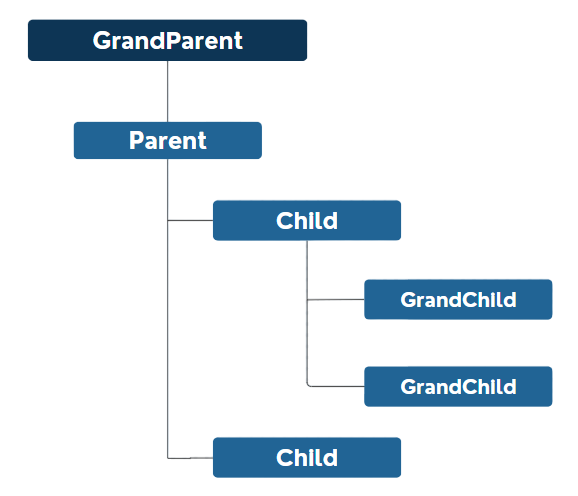
Example Of GrandParent → Parent → Child in a Nested Lightning Web Component(LWC)
-
This project is a Lightning Web Components (LWC) example that shows how data flows from a grandparent component to parent, then to child, and finally to grandchild.
-
The user types a message into a text box in the Container (Grandparent) component.
-
That message is passed down step-by-step to the Parent, Child, and Grandchild components.
-
Each component has a button that, when clicked, shows the received message.
The @api decorator is used in LWC to expose a public property so that a parent component can pass a value to its child. This makes the component reactive, so if the value changes in the parent, the child automatically updates.
Container Component (GrandParent)
-
A text input where the user types a message.
-
The message is saved in a variable and passed to the Parent component.
containerComponent.html:
<template>
    <lightning-card title="Container (Grandparent)">
        <lightning-input label="Enter Message" value={message} onchange={handleInputChange} class="slds-m-around_small"></lightning-input>
        <c-parent-component message-from-container={message}></c-parent-component>
    </lightning-card>
</template>
containerComponent.js:
import { LightningElement } from 'lwc';

export default class ContainerComponent extends LightningElement {
    message = '';
    handleInputChange(event) {
        this.message = event.target.value;
    }
}
parent Component (Parent)
-
Gets the message from containerComponent using
@api. -
Displays the message when the button is clicked.
-
Passes the message to the Child component.
parentComponent.html:
<template>
    <lightning-card title="Parent">
        <lightning-button label="Show Message (From Container)" onclick={handleShowMessage} class="slds-m-left_small"></lightning-button>
        <template if:true={showMessage}>
            <p style="padding: 1rem;"><strong>{messageFromContainer}</strong></p>
        </template>
        <c-child-component message-from-parent={messageFromContainer}></c-child-component>
    </lightning-card>
</template>
parentComponent.js
import { LightningElement , api} from 'lwc';

export default class ParentComponent extends LightningElement {
    @api messageFromContainer;
    showMessage = false;
    handleShowMessage() {
        this.showMessage = true;
    }
}
child Component (Child)
-
Gets the message from ParentComponent using
@api. -
Displays the message when the button is clicked.
-
Passes the message to the GrandChild component.
childComponent.html
<template>
    <lightning-card title="Child">
        <lightning-button label="Show Message (From Parent)" onclick={handleShowMessage} class="slds-m-left_small"></lightning-button>
        <template if:true={showMessage}>
            <p style="padding: 1rem;"><strong>{messageFromParent}</strong></p>
        </template>
        <c-grand-child-component message-from-child={messageFromParent}></c-grand-child-component>
    </lightning-card>
</template>
childComponent.js
import { LightningElement, api } from 'lwc';

export default class ChildComponent extends LightningElement {
     @api messageFromParent;
    showMessage = false;
    handleShowMessage() {
        this.showMessage = true;
    }
}
Grandchild Component (Grandchild)
-
Gets the message from childComponent using
@api. -
Displays the message when the button is clicked.
grandchildComponent.html
<template>
    <lightning-card title="Grandchild">
        <lightning-button label="Show Message (From Child)" onclick={handleShowMessage} class="slds-m-left_small"></lightning-button>
        <template if:true={showMessage}>
            <p style="padding: 1rem;"><strong>{messageFromChild}</strong></p>
        </template>
    </lightning-card>
</template>
grandchildComponent.js
import { LightningElement, api } from 'lwc';

export default class GrandchildComponent extends LightningElement {
    @api messageFromChild;
    showMessage = false;
    handleShowMessage() {
        this.showMessage = true;
    }
}
Output
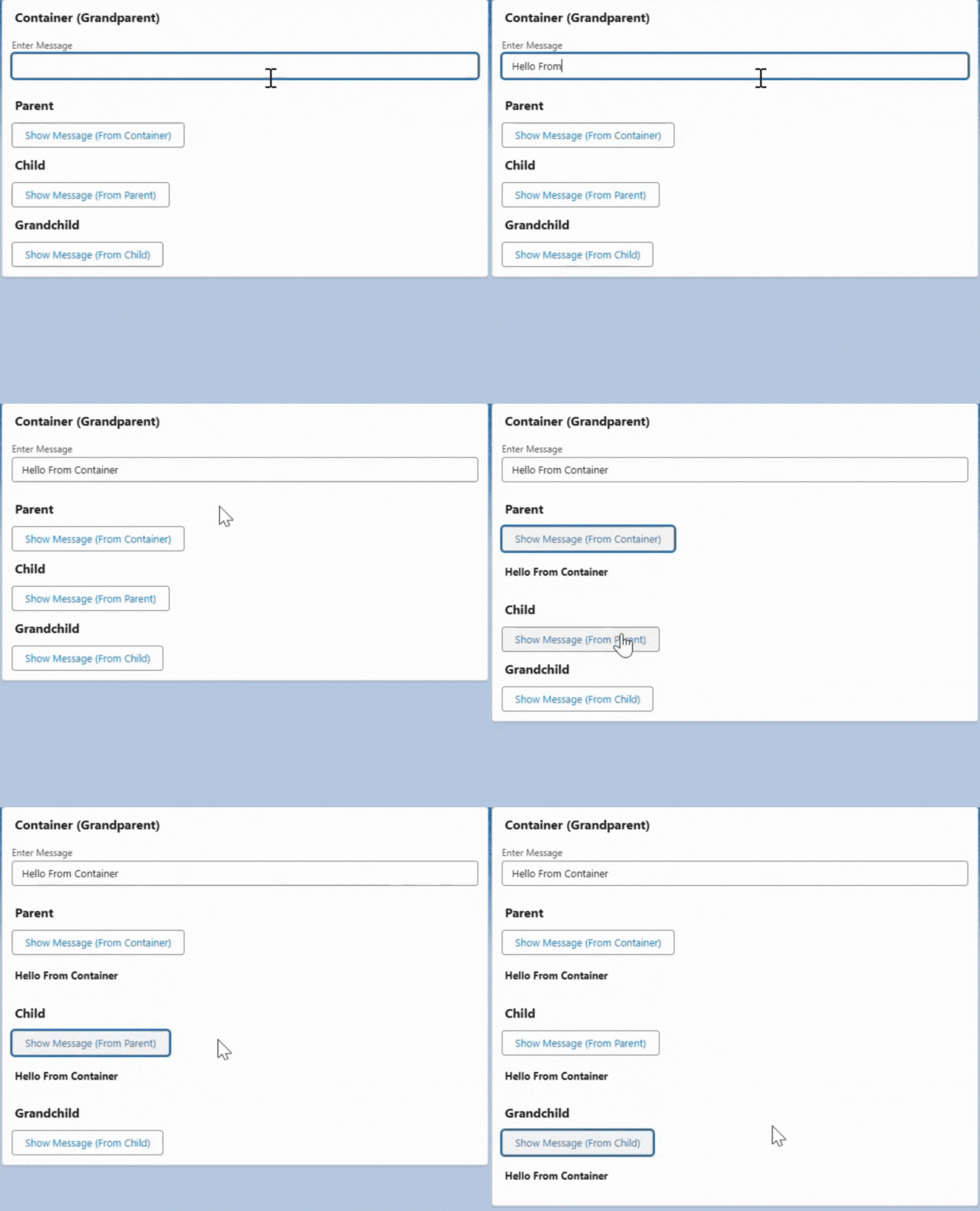
Example Of Child → Parent → Grandparent In a Nested Lightning Web Component (LWC)
-
This project is another Lightning Web Components (LWC) example, but this time the message flows UP instead of down.
-
The user types a message in the Grandchild component.
-
The message is sent upward: from Grandchild → Child → Parent → Grandparent (Container).
-
Each component dispatches a custom event carrying the message up one level.
-
Every component shows the message when the user clicks a button.
In this component structure (Grandchild → Child → Parent → Grandparent), we used dispatchEvent to enable the grandchild component to send a message all the way up to the container Component (grandparent).
Grandchild Component (Grandchild)
-
User enters a message and clicks a button.
-
That message is sent upwards by firing a custom event (
messagefromgrandchild).
grandchildComponent.html
<template>
    <lightning-card title="Grandchild">
        <lightning-input label="Enter Message" onchange={handleInputChange} class="slds-m-around_small"></lightning-input>
        <lightning-button label="Send Message to Child" onclick={sendMessageToChild} class="slds-m-left_small"></lightning-button>
    </lightning-card>
</template>
grandchildComponent.js:
import { LightningElement } from 'lwc';

export default class GrandChildComponent extends LightningElement {
     message = '';
    handleInputChange(event) {
        this.message = event.target.value;
    }
    sendMessageToChild() {
        this.dispatchEvent(new CustomEvent('messagefromgrandchild', {
            detail: this.message
        }));
    }
  }
}
Child Component (Child)
-
Listens to Grandchild’s message.
-
Shows the message when button clicked.
-
Forwards the message upwards by firing another custom event (
messagefromchild).
childComponent.html
<template>
    <lightning-card title="Child">
        <lightning-button label="Show Grandchild's Message" onclick={showMessage} class="slds-m-left_small"></lightning-button>
        <template if:true={showMessageFlag}>
            <p style="padding: 1rem;"><strong>{message}</strong></p>
        </template>
        <c-grand-child-component onmessagefromgrandchild={handleMessageFromGrandchild}></c-grand-child-component>
    </lightning-card>
</template>
childComponent.js
import { LightningElement } from 'lwc';

export default class ChildComponent extends LightningElement {
    message = '';
    showMessageFlag = false;
    handleMessageFromGrandchild(event) {
        this.message = event.detail;
        this.dispatchEvent(new CustomEvent('messagefromchild', {
            detail: this.message
        }));
    }
    showMessage() {
        this.showMessageFlag = true;
    }
}
Parent Component (Parent)
-
Listens to Child’s message.
-
Shows the message when button clicked.
-
Sends the message up to Container by firing a custom event (
messagefromparent).
parentComponent.html
<template>
    <lightning-card title="Parent">
        <lightning-button label="Show Child's Message" onclick={showMessage} class="slds-m-left_small"></lightning-button>
        <template if:true={showMessageFlag}>
            <p style="padding: 1rem;"><strong>{message}</strong></p>
        </template>
        <c-child-component onmessagefromchild={handleMessageFromChild}></c-child-component>
    </lightning-card>
</template>
parentComponent.js
import { LightningElement } from 'lwc';

export default class ParentComponent extends LightningElement {
    message = '';
    showMessageFlag = false;
    handleMessageFromChild(event) {
        this.message = event.detail;
        this.dispatchEvent(new CustomEvent('messagefromparent', {
            detail: this.message
        }));
    }
    showMessage() {
        this.showMessageFlag = true;
    }
}
Container Component (Grand Parent)
-
Receives the message from Parent.
-
Shows message when button is clicked.
containerComponent.html
<template>
    <lightning-card title="Container (Grandparent)">
        <lightning-button label="Show Parent's Message" onclick={showMessage} class="slds-m-left_small"></lightning-button>

        <template if:true={showMessageFlag}>
            <p style="padding: 1rem;"><strong>{message}</strong></p>
        </template>
        <c-parent-component onmessagefromparent={handleMessageFromParent}></c-parent-component>
    </lightning-card>
</template>
containerComponent.js
import { LightningElement } from 'lwc';

export default class ContainerComponent extends LightningElement {
    message = '';
    showMessageFlag = false;
    handleMessageFromParent(event) {
        this.message = event.detail;
    }
    showMessage() {
        this.showMessageFlag = true;
    }
}
Output:
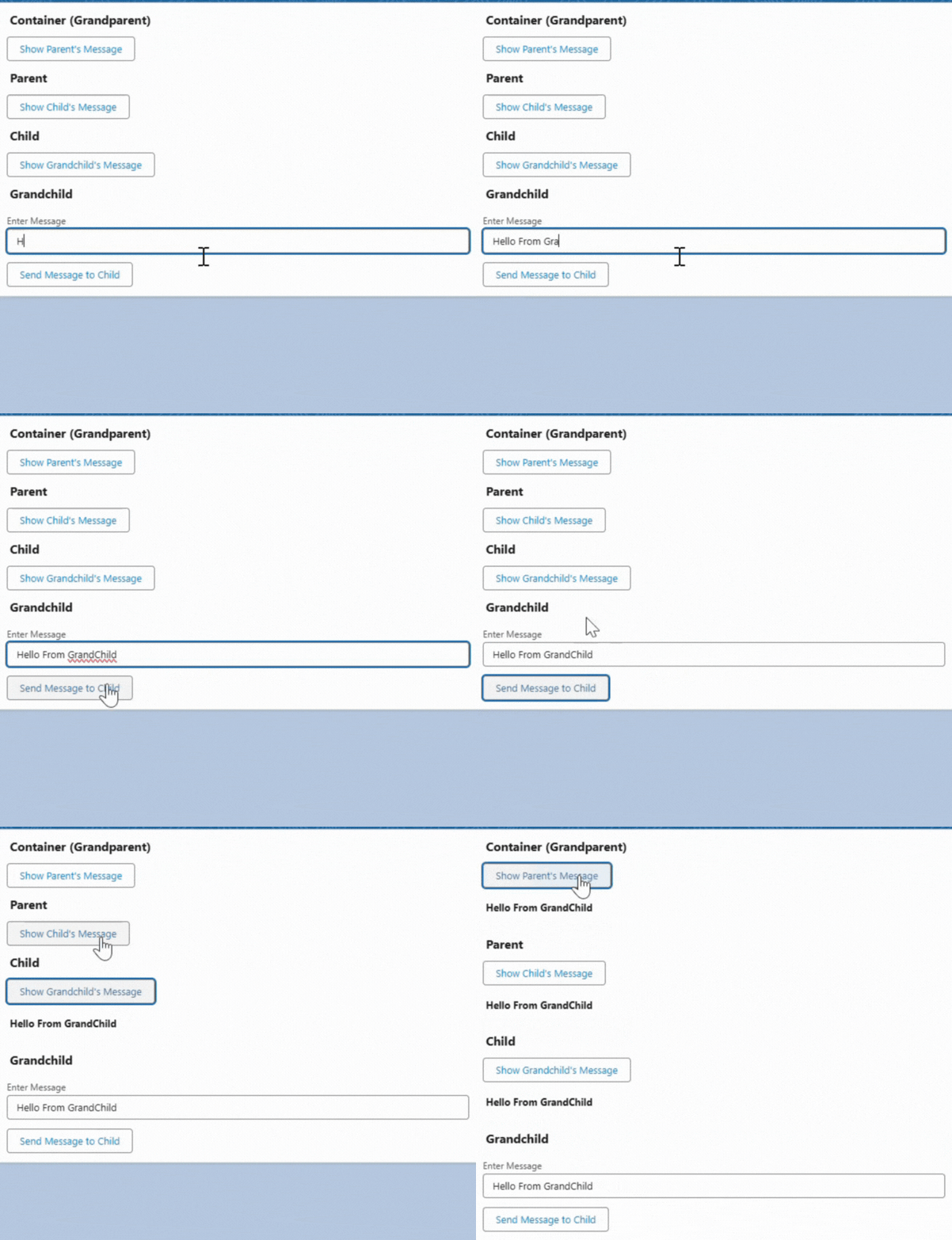
Use Cases of Nested LWC Structures
-
🔁 Component Composition: Break complex pages into reusable, maintainable components like headers, forms, and footers.
-
🧩 Scoped Data Handling: Manage specific data blocks (like product lines or quote items) within isolated child components.
-
🔄 Propagation of Changes: Send updated values from child to parent or grandchild to grandparent for synchronized updates.