2026-01-07 12:57:28
Drag and Drop with Lighting Web Components Guide
Drag and Drop is a user interface pattern that allows users to select an object by "grabbing" it and dragging it to a different location. In LWC, you can implement this functionality using standard HTML5 Drag and Drop API along with Lightning Web Components.
Key Uses of Drag-and-Drop
-
Improved User Experience (UX)
-
Intuitive Interaction: Drag-and-drop allows users to interact with the system in a way that feels natural and intuitive. By allowing users to "drag" content visually, it mimics real-world object manipulation, which makes the interface feel more interactive.
-
-
Reordering Lists or Items
-
Example: Drag-and-drop enables users to reorder lists of tasks, emails, or records (like Accounts in Salesforce). This allows users to adjust priorities or workflows visually without needing complex configuration or settings.
-
Benefits of Drag-and-Drop
-
Simplifies Complex Interactions: Instead of requiring multiple steps, drag-and-drop simplifies the interaction. For example, reordering items in a list becomes as easy as clicking and dragging a card to the new position.
-
Enhances Visual Engagement: It makes the interface more engaging and less static. People enjoy the tactile nature of dragging items and the immediate feedback it provides.
-
Saves Time: By removing the need for multiple actions, drag-and-drop can be much quicker and more efficient for users who need to perform repetitive tasks or make frequent changes.
How to Use Drag and Drop in Lighting Web Component
A Lightning Web Component that:
-
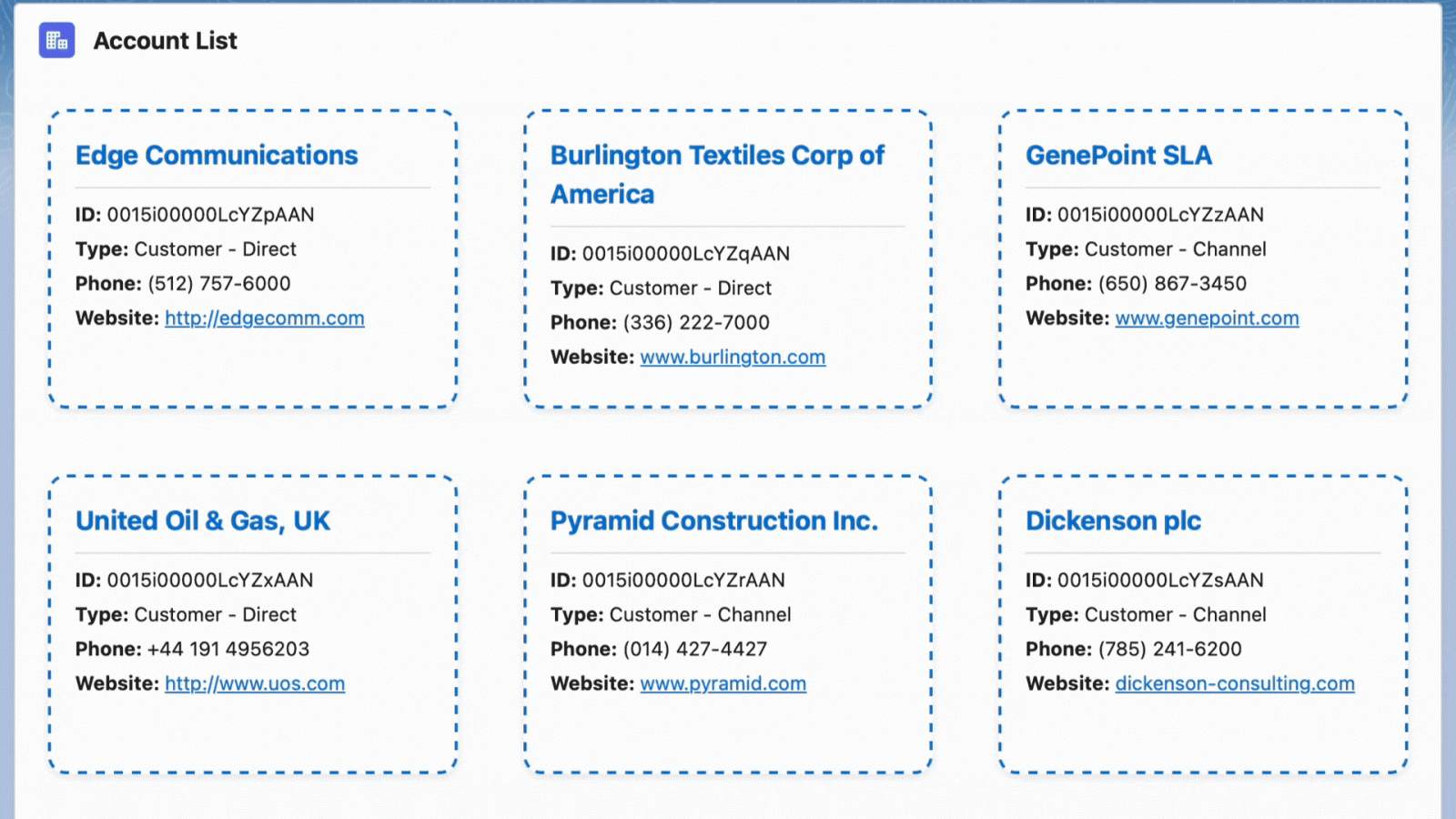
Displays Account records as “tickets”
-
Allows the user to drag and drop them to reorder
-
Persists the new order using the
sequence__cfield via Apex DML
1. LWC Template (HTML)
Each account is rendered as a draggable “ticket” styled with SLDS:
<template>
    <lightning-card title="Account Tickets" icon-name="standard:account">
        <template if:true={accounts}>
            <div class="ticket-container" ondragover={handleDragOver}>
                <template for:each={accounts} for:item="account" for:index="index">
                    <div key={account.Id}
                         class="slds-col slds-size_1-of-1 slds-medium-size_1-of-2 slds-large-size_1-of-4 slds-p-around_small"
                         draggable="true"
                         data-index={index}
                         ondragstart={handleDragStart}
                         ondrop={handleDrop}>
                        <div class="ticket">
                            <div class="ticket-header">
                                <strong>{account.Name}</strong>
                            </div>
                            <div class="ticket-body">
                                <p><strong>ID:</strong> {account.Id}</p>
                                <p><strong>Type:</strong> {account.Type}</p>
                                <p><strong>Phone:</strong> {account.Phone}</p>
                                <p><strong>Website:</strong> <a href={account.Website} target="_blank">{account.Website}</a></p>
                            </div>
                        </div>
                    </div>
                </template>
            </div>
        </template>
        <template if:true={error}>
            <p class="slds-text-color_error">{error}</p>
        </template>
    </lightning-card>
</template>
What does ondragstart do?
When a user starts dragging an element (by clicking and holding the mouse button), the dragstart event is fired. This event allows you to:
-
Track which element is being dragged
-
Store necessary data (like the index or ID of the item) for use when the drop occurs
-
Apply visual feedback if needed
What does ondrop do?
The drop event is triggered when a draggable element is dropped onto a valid drop target. This is where you typically:
-
Rearrange the data (e.g., reorder a list)
-
Persist changes (e.g., send an update to the backend)
-
Update the UI to reflect the new order
2. Frontend: LWC JavaScript
The component handles fetching, reordering, and updating accounts:
import { LightningElement, track } from 'lwc';
import getRecentAccounts from '@salesforce/apex/AccountController.getRecentAccounts';
import updateAccountSequences from '@salesforce/apex/AccountController.updateAccountSequences';

export default class DragAndDrop extends LightningElement {
    @track accounts = [];
    error;
    draggedIndex = null;

  connectedCallback() {
      getRecentAccounts()
          .then(result => {
              this.accounts = [...result];
          })
          .catch(error => {
              this.error = error.body.message;
          });
  }

  handleDragStart(event) {
      this.draggedIndex = +event.currentTarget.dataset.index;
  }

  handleDragOver(event) {
      event.preventDefault(); // Required to allow drop
  }

  handleDrop(event) {
      event.preventDefault();
      const droppedIndex = +event.currentTarget.dataset.index;

      const items = [...this.accounts];
      const [movedItem] = items.splice(this.draggedIndex, 1);
      items.splice(droppedIndex, 0, movedItem);

      this.accounts = items.map((acc, index) => ({
          ...acc,
          sequence__c: index
      }));

      updateAccountSequences({ updatedAccounts: this.accounts })
          .then(() => {
              console.log('Account sequences updated successfully');
          })
          .catch(error => {
              this.error = error.body.message;
          });
  }
}
3. Backend: Apex Controller
We need two methods:
-
To fetch the accounts
-
To update their
sequence__cvalues after drag-and-drop
public with sharing class AccountController {
  @AuraEnabled(cacheable=true)
  public static List<Account> getRecentAccounts() {
      return [
          SELECT Id, Name, Type, Phone, Website, sequence__c
          FROM Account
          WHERE Type != null AND Website != null AND Phone != null AND sequence__c != null
          ORDER BY sequence__c
      ];
  }

  @AuraEnabled
  public static void updateAccountSequences(List<Account> updatedAccounts){
      try {
          if(updatedAccounts != null && !updatedAccounts.isEmpty()) {
              List<Account> accountsToUpdate = new List<Account>();
              for(Account acc : updatedAccounts){
                  if(acc.sequence__c != null){
                      accountsToUpdate.add(new Account(Id = acc.Id, sequence__c = acc.sequence__c));
                  }
              }
              if(!accountsToUpdate.isEmpty()){
                  update accountsToUpdate;
              }
          }
      } catch (Exception e) {
          throw new AuraHandledException(e.getMessage());
      }
  }
}
4. Styling: dragAndDrop.css
Use SLDS + custom styles for spacing and aesthetics:
.ticket-container {
    display: flex;
    flex-wrap: wrap;
    justify-content: center;
}

.ticket {
    background: #ffffff;
    border: 2px dashed #0070d2;
    border-radius: 12px;
    padding: 16px;
    margin: 10px;
    box-shadow: 0 2px 6px rgba(0, 0, 0, 0.1);
    cursor: move;
    transition: transform 0.2s ease-in-out;
    min-height: 200px;
}

.ticket:hover {
    transform: scale(1.02);
}

.ticket-header {
    border-bottom: 1px solid #d8dde6;
    padding-bottom: 8px;
    margin-bottom: 8px;
    font-size: 1.1rem;
    color: #0070d2;
}

.ticket-body p {
    margin: 4px 0;
    word-break: break-word;
}

.ticket-body a {
    color: #0070d2;
    text-decoration: underline;
}
5. Metadata Configuration
Expose the component on the Lightning Home Page:
<?xml version="1.0" encoding="UTF-8"?>
<LightningComponentBundle xmlns="http://soap.sforce.com/2006/04/metadata">
    <apiVersion>63.0</apiVersion>
    <isExposed>true</isExposed>
    <targets>
        <target>lightning__HomePage</target>
    </targets>
</LightningComponentBundle>
Output